
Tuesday, 10 September 2013
Email Marketing Terms You Need To Know:
Labels:
advice
,
email marketing
,
Help
,
tips
It's easy to get lost in conversation when people use a lot of Email Marketing jargon. So, to help you further understand Email Marketing we have explained the key Email Marketing terms we feel you need to know.
Don't forget: If this helps you in any way then please share it on twitter by clicking this link: http://clicktotweet.com/O8w9Z
CAN-SPAM Act of 2003
The United States of America introduced this Federal anti-spam legislation. It was passed in 2003 and requires the following in each email: a legitimate header, a valid ‘From’ address and a straightforward ‘Subject’ line. Also required by the act is an unsubscribe/opt-out option and/or instructions and a physical address. It also requires that all unsubscribes are processed within ten days of receipt.
Spam or UCE (Unsolicited Commercial Email)
Email sent to someone who has not opted-in or given inferred permission to the sender to send any mail to them. Our definition of SPAM is: "It's spam if it is both unsolicited and has no inferred connection to the receiver or receivers". Our technical interpretation is: "the recipient's personal identity and context are irrelevant because the message is equally applicable to many other potential recipients; and the recipient has not verifiably granted deliberate and explicit permission for it to be sent, that is, opted-in or subscribed to receive the received email; and the transmission and reception of the message appears to the recipient to give a disproportionate benefit to the sender.”
Viral Marketing
A type of marketing that is carried out voluntarily by the targeted company's customers. The electronic equivalent of 'word-of-mouth advertising'. Email has made this type of marketing both relevant and prevalent. Tools such as ‘send this page or ‘email to a friend’ encourage people to refer or recommend your company’s product, service or a specific offer to others.
Subscribe
To subscribe to an email list so the user can receive future emails.
Single opt-in
Once the most widely accepted and routinely used method of obtaining email addresses and permission. A single opt-in list is created by inviting visitors and customers to subscribe to your email list. When you use a sign-up form on your website, a message immediately goes out to the subscriber acknowledging the subscription (a good example of an auto-responder). This message should reiterate what the subscriber has signed up for and provide an immediate way for the subscriber to edit her interests or opt-out.
Unsubscribe
To remove oneself from an email list, either filling in a web form – clicking the unsubscribe link in the footer.
Hard bounce/Soft bounce
A hard bounce is the failed delivery of an email due to a permanent issue like a non-existent address. A soft bounce is the failed delivery of an email due to a temporary issue, like a full mailbox, server down, congestion on the net or outage.
Triggers
Triggers send automated follow-up emails based on the recipient's reaction to an email you've sent to them. Triggers can be set up to send a time-delayed email when the recipient clicks on the link or opens an email. They're great for sending thank-you emails or for sending coupons to people who've clicked on a product.
Auto-responder
An auto-responder will automatically send a response/alert to a specified email contact when someone sends a message to its address. The most common uses of auto-responders are for subscribe (opt-in) and unsubscribe (opt-out) confirmations, welcome emails and customer support questions.
Text-only newsletter
Plain newsletter with words only, no colours, graphics, fonts or pictures; can be received by anyone who has email.
ROI
Return on Investment. From an email marketing perspective, understanding this number helps you determine where to put your advertising pounds, which campaigns are performing best, what percentage of your investments are turning directly into income, and how much it costs you to find and retain clients.
Conversion rate
The percentage of emailed recipients who responded to your specific email marketing campaign or promotion. This is the measure of your email marketing campaign's success. Your conversions can be measured in all things related to the campaign, that is, sales, phone calls, appointments and so on.
Open rate
The percentage of emails opened in any given email marketing campaign, or the percentage opened of the total number of emails sent.
CTR (or click-through rate)
The number of unique clicks divided by the number of emails that were opened, expressed as a percentage.
CTA (call to action)
Call to action. This relates to the buttons or links you present within your email i.e. the action that you would like the recipient to take. It is best to change the buttons, images and links used to see what works best with your mailing list.
Above-the-fold or sill (preview pane in your email client)
The part of a web page or email client that is visible without scrolling. If you have a 'Join our mailing list' or 'Subscribe now' tag on your website, place it 'above the fold/sill' - it makes it easy for visitors and clients to opt-in and opt-out.
Landing page
A web page that is directly linked from an email for the purpose of providing additional information on products or services promoted in the email.
Read More
Don't forget: If this helps you in any way then please share it on twitter by clicking this link: http://clicktotweet.com/O8w9Z
CAN-SPAM Act of 2003
The United States of America introduced this Federal anti-spam legislation. It was passed in 2003 and requires the following in each email: a legitimate header, a valid ‘From’ address and a straightforward ‘Subject’ line. Also required by the act is an unsubscribe/opt-out option and/or instructions and a physical address. It also requires that all unsubscribes are processed within ten days of receipt.
Spam or UCE (Unsolicited Commercial Email)
Email sent to someone who has not opted-in or given inferred permission to the sender to send any mail to them. Our definition of SPAM is: "It's spam if it is both unsolicited and has no inferred connection to the receiver or receivers". Our technical interpretation is: "the recipient's personal identity and context are irrelevant because the message is equally applicable to many other potential recipients; and the recipient has not verifiably granted deliberate and explicit permission for it to be sent, that is, opted-in or subscribed to receive the received email; and the transmission and reception of the message appears to the recipient to give a disproportionate benefit to the sender.”
Viral Marketing
A type of marketing that is carried out voluntarily by the targeted company's customers. The electronic equivalent of 'word-of-mouth advertising'. Email has made this type of marketing both relevant and prevalent. Tools such as ‘send this page or ‘email to a friend’ encourage people to refer or recommend your company’s product, service or a specific offer to others.
Subscribe
To subscribe to an email list so the user can receive future emails.
Single opt-in
Once the most widely accepted and routinely used method of obtaining email addresses and permission. A single opt-in list is created by inviting visitors and customers to subscribe to your email list. When you use a sign-up form on your website, a message immediately goes out to the subscriber acknowledging the subscription (a good example of an auto-responder). This message should reiterate what the subscriber has signed up for and provide an immediate way for the subscriber to edit her interests or opt-out.
Unsubscribe
To remove oneself from an email list, either filling in a web form – clicking the unsubscribe link in the footer.
Hard bounce/Soft bounce
A hard bounce is the failed delivery of an email due to a permanent issue like a non-existent address. A soft bounce is the failed delivery of an email due to a temporary issue, like a full mailbox, server down, congestion on the net or outage.
Triggers
Triggers send automated follow-up emails based on the recipient's reaction to an email you've sent to them. Triggers can be set up to send a time-delayed email when the recipient clicks on the link or opens an email. They're great for sending thank-you emails or for sending coupons to people who've clicked on a product.
Auto-responder
An auto-responder will automatically send a response/alert to a specified email contact when someone sends a message to its address. The most common uses of auto-responders are for subscribe (opt-in) and unsubscribe (opt-out) confirmations, welcome emails and customer support questions.
Text-only newsletter
Plain newsletter with words only, no colours, graphics, fonts or pictures; can be received by anyone who has email.
ROI
Return on Investment. From an email marketing perspective, understanding this number helps you determine where to put your advertising pounds, which campaigns are performing best, what percentage of your investments are turning directly into income, and how much it costs you to find and retain clients.
Conversion rate
The percentage of emailed recipients who responded to your specific email marketing campaign or promotion. This is the measure of your email marketing campaign's success. Your conversions can be measured in all things related to the campaign, that is, sales, phone calls, appointments and so on.
Open rate
The percentage of emails opened in any given email marketing campaign, or the percentage opened of the total number of emails sent.
CTR (or click-through rate)
The number of unique clicks divided by the number of emails that were opened, expressed as a percentage.
CTA (call to action)
Call to action. This relates to the buttons or links you present within your email i.e. the action that you would like the recipient to take. It is best to change the buttons, images and links used to see what works best with your mailing list.
Above-the-fold or sill (preview pane in your email client)
The part of a web page or email client that is visible without scrolling. If you have a 'Join our mailing list' or 'Subscribe now' tag on your website, place it 'above the fold/sill' - it makes it easy for visitors and clients to opt-in and opt-out.
Landing page
A web page that is directly linked from an email for the purpose of providing additional information on products or services promoted in the email.

Monday, 9 September 2013
Improvements We Have Made For You...
Labels:
dashboard
,
data collection
,
email template
,
free templates
,
mobile editor
,
new features
,
news
,
Reports and Statistics
,
social browser widget
,
social subscribe
We continually improve our system by providing you with more features, improving our interface and more. By doing this we make sure our GraphicMail customers have the best Email Marketing tools at their finger-tips.
Lately we have improved our system by including:
They are allocated into categories to help you locate the type of email template you would like to use.
Here is an example of some email templates you can use:
 We would love to get your feedback about our recent updates so please join us on Facebook and Twitter and leave us a comment.
Read More
Lately we have improved our system by including:
- New Reports & Statistics - We included a new Reports & Statistics section which is more interactive, informative and provides you with more details to help you understand your subscribers.
- New Import Option - OneSaas allows you to connect to more than 50 apps, meaning you can import contacts from CMS, CRM, eventing and financial apps and more.
- New Mobile Editor - Create free mobile sites and you can now even include a link into the text message for free.
- New Dashboard - This provides you with key account information and allows you to post directly to Facebook and Twitter.
- New Social Subscribe - Allow users to sign up to your mailing list via their Social Network accounts.
- List Clean Up tool - Our List Clean Up tool can stop complaints, get rid of bounces and improve delivery.
- New Social Browser Widget - Comment about your newsletter, signup, change the language and more.
- Heat Maps - We have recently added new Heat Maps to our Reports & Statistics section which means you can see where people are clicking in your email.
They are allocated into categories to help you locate the type of email template you would like to use.
Here is an example of some email templates you can use:
Wednesday, 4 September 2013
Have You Joined Our Webinars Yet?
Labels:
advice
,
email marketing
,
presentation
,
tips
,
webinars
Did you know that we conduct webinars each week? We try to make it as easy as possible for our users to get to grips with the basics all the way to the more advanced features.
All of our webinars are FREE to join so all you need to do is go to our webinar page by clicking here and choose which ones you would like to join. We try to include a webinar each week and differ the days and times they are hosted to try and make them available for everyone.
The webinars we currently host are:
This is what our client's say about them:
"Such an easy and effortless way of ensuring you are making the most of the facilities available from GraphicMail. I will try to ensure I catch the others!"
Here is a sneak preview of the presentation our support staff use within our "Increase Open & Click-through Rates" webinar:
Don't forget to join our webinars, to view the webinars we are hosting this month just click here.
Alternatively just join us on a Facebook and Twitter to keep updated with our new webinars, email marketing tips and freebies.
Read More
All of our webinars are FREE to join so all you need to do is go to our webinar page by clicking here and choose which ones you would like to join. We try to include a webinar each week and differ the days and times they are hosted to try and make them available for everyone.
The webinars we currently host are:
- Learn The Basics
- Importance of Testing
- Overview of Advanced Features
- Increase Open & Click-through Rates
This is what our client's say about them:
"Such an easy and effortless way of ensuring you are making the most of the facilities available from GraphicMail. I will try to ensure I catch the others!"
Here is a sneak preview of the presentation our support staff use within our "Increase Open & Click-through Rates" webinar:
Don't forget to join our webinars, to view the webinars we are hosting this month just click here.
Alternatively just join us on a Facebook and Twitter to keep updated with our new webinars, email marketing tips and freebies.
Monday, 2 September 2013
Yahoo! Are Reusing Inactive Email Addresses
Labels:
advice
,
Best Practice
,
delivery
,
list clean up
,
mailing lists
,
tips
,
yahoo
Yahoo! Have recently stated they are going to be reusing email addresses that have not been accessed in the past 12 months.
Yahoo stated: "We’re freeing up IDs, that have been inactive for at least 12 months, by resetting them and giving them a fresh start. In mid July, anyone can have a shot at scoring the Yahoo! ID they want. In mid August, users who staked a claim on certain IDs can come to Yahoo! to discover which one they got". For the full statement click here.
From 15th July you can apply for a new Yahoo! ID, and in August they will let you know if you have got the new ID you requested. This means if you send to a Yahoo email address which has been inactive for 12 months (an email address they are going to be reusing) then you will receive a bounce back. Yahoo have stated they will continue to give you a bounce back for those particular email addresses for a month as that will give you plenty of time to remove them from your list.
Our system will automatically remove the bounced email addresses from your list; however it is always best to delete them entirely. This will make sure there is no way for you to resend to those bad email addresses.
How It Can Affect You
As Yahoo are going to be reusing inactive email addresses this means that if an email address has not been used for 12 months then it can be reassigned to a new Yahoo user. Due to this you will need to make sure you only send to Yahoo users who have taken action with your emails within the past 12 months. If you ignore this and continue to send to all of your Yahoo subscribers then you may end up sending to a Yahoo email address which has been reassigned to another Yahoo user. This means the new user will not know why you are sending an email to them as they have not specifically subscribed to receive your email they may report it as spam.
It is YOUR responsibility to ensure your list is clean and only contains those that have subscribed to receive your emails. With this information you should review your Yahoo email addresses to make sure you only send to those that are taking action with your email.
Actions You Can Take:
You can use our List Clean Up tool which will automatically remove any bad email addresses including inactive Yahoo email addresses from your list. This will then leave you with a clean list of active email addresses ready for you to send to.
Alternatively you can create a list of email addresses that have taken action with your emails and then a list of all of the Yahoo email addresses you have. You can then filter the list containing those that have taken action with your emails through a list of your Yahoo email addresses. You will then be left with the Yahoo email addresses that have not taken any action in your emails.
Once you have that list it is then best to delete those email addresses as those email addresses are more than likely going to be reassigned to other new Yahoo users.
Read More
Yahoo stated: "We’re freeing up IDs, that have been inactive for at least 12 months, by resetting them and giving them a fresh start. In mid July, anyone can have a shot at scoring the Yahoo! ID they want. In mid August, users who staked a claim on certain IDs can come to Yahoo! to discover which one they got". For the full statement click here.
From 15th July you can apply for a new Yahoo! ID, and in August they will let you know if you have got the new ID you requested. This means if you send to a Yahoo email address which has been inactive for 12 months (an email address they are going to be reusing) then you will receive a bounce back. Yahoo have stated they will continue to give you a bounce back for those particular email addresses for a month as that will give you plenty of time to remove them from your list.
Our system will automatically remove the bounced email addresses from your list; however it is always best to delete them entirely. This will make sure there is no way for you to resend to those bad email addresses.
How It Can Affect You
As Yahoo are going to be reusing inactive email addresses this means that if an email address has not been used for 12 months then it can be reassigned to a new Yahoo user. Due to this you will need to make sure you only send to Yahoo users who have taken action with your emails within the past 12 months. If you ignore this and continue to send to all of your Yahoo subscribers then you may end up sending to a Yahoo email address which has been reassigned to another Yahoo user. This means the new user will not know why you are sending an email to them as they have not specifically subscribed to receive your email they may report it as spam.
It is YOUR responsibility to ensure your list is clean and only contains those that have subscribed to receive your emails. With this information you should review your Yahoo email addresses to make sure you only send to those that are taking action with your email.
Actions You Can Take:
You can use our List Clean Up tool which will automatically remove any bad email addresses including inactive Yahoo email addresses from your list. This will then leave you with a clean list of active email addresses ready for you to send to.
Alternatively you can create a list of email addresses that have taken action with your emails and then a list of all of the Yahoo email addresses you have. You can then filter the list containing those that have taken action with your emails through a list of your Yahoo email addresses. You will then be left with the Yahoo email addresses that have not taken any action in your emails.
Once you have that list it is then best to delete those email addresses as those email addresses are more than likely going to be reassigned to other new Yahoo users.
Thursday, 29 August 2013
Heat Maps Are Now Available!
Labels:
advanced features
,
heat maps
,
new features
,
Reports and Statistics
,
tracking
We are constantly updating our service to try and make sure you have the best features at your finger-tips. Our Reports & Statistics section has made a massive change over the last year as we have introduced interactive charts, extensive data to be exported, geo-location and now we have something new to introduce.
You will now see you have access to Heat Maps which will show you where your subscribers are clicking on your email. The heat map will display blue, green and red circles to indicate how many people are clicking on specific areas. If you see a red circle as shown below then you will know most people have clicked on that particular area.
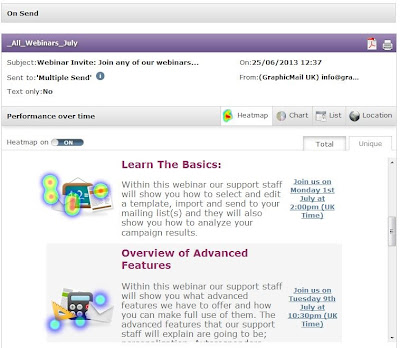 Using this new feature you can now see where people are clicking on your email, and if they aren't clicking on certain areas then you can make the necessary changes:
We hope you like it and don't forget to leave a comment below and of course join us on Facebook and Twitter to keep up to date with more tips, features and email marketing advice.
Read More
You will now see you have access to Heat Maps which will show you where your subscribers are clicking on your email. The heat map will display blue, green and red circles to indicate how many people are clicking on specific areas. If you see a red circle as shown below then you will know most people have clicked on that particular area.

- Are the buttons too small?
- Which links are being used the most?
- Should you include more images or buttons?
We hope you like it and don't forget to leave a comment below and of course join us on Facebook and Twitter to keep up to date with more tips, features and email marketing advice.
Tuesday, 27 August 2013
Free Back To School Email Template
Labels:
Email Design
,
email marketing
,
email template
,
free
,
free templates
,
tips
School is just around the corner and every parent knows it as they get their children ready to make their next step in their schooling career.
As there is only 1 week left until the children go back to school, now is the best time to start sending your exclusive Back To School offers. To make sure you don't miss out on this ideal sales opportunity you can download our FREE Back To School Email Template.
Just edit the images and text within the template to advertise your own back to school products and final reductions.
Live View:
To view the template in your browser just click here
We have displayed the HTML code used for the template below so you can just copy this code and use it to import the template into your account:
We hope you make great use of this FREE Email Template and we wish you luck with your email campaign!
Don't Forget: If you don't already have a GraphicMail account then you can sign up to our 30 day free trial and gain access to 400 more free templates, to sign up just click here.
Read More
As there is only 1 week left until the children go back to school, now is the best time to start sending your exclusive Back To School offers. To make sure you don't miss out on this ideal sales opportunity you can download our FREE Back To School Email Template.
Just edit the images and text within the template to advertise your own back to school products and final reductions.
Live View:
To view the template in your browser just click here
We have displayed the HTML code used for the template below so you can just copy this code and use it to import the template into your account:
We hope you make great use of this FREE Email Template and we wish you luck with your email campaign!
Don't Forget: If you don't already have a GraphicMail account then you can sign up to our 30 day free trial and gain access to 400 more free templates, to sign up just click here.
Friday, 23 August 2013
UK Office Closed For Bank Holiday
Labels:
bank holiday
,
notice
,
office closed
,
UK office
We would like to notify you that our UK office will be closed at an earlier time of 4pm today (Friday 23rd August) and all day Monday 26th August for a Bank Holiday which means our telephone and livechat support will be closed during that time.
Although the live chat and telephone support will be closed, our support team will answer all queries when they return on Tuesday 27th August. If you can't wait until Tuesday then don't worry as we have provided all support materials below:
• Download our interactive manual
• View our online video tutorials
• Search through our Help Centre
• View our previous training webinars
• Email us
We hope you all enjoy a well-deserved break.
Read More
Although the live chat and telephone support will be closed, our support team will answer all queries when they return on Tuesday 27th August. If you can't wait until Tuesday then don't worry as we have provided all support materials below:
• Download our interactive manual
• View our online video tutorials
• Search through our Help Centre
• View our previous training webinars
• Email us
We hope you all enjoy a well-deserved break.
Subscribe to:
Posts
(
Atom
)
Follow Us


Popular Posts
-
 Have you noticed our new dashboard yet? If not then just log into your account and click on the " Home " tab. Alternatively if you...
-
 Take an exclusive peek at our New Mobile Editor which you will have access to very shortly! Soon you will be able to create a free mobile ...
-
GraphicMail is currently in the last phase of completing the integration of a new email newsletter editor that will let you easily create ...