
Thursday, 29 August 2013
Heat Maps Are Now Available!
Labels:
advanced features
,
heat maps
,
new features
,
Reports and Statistics
,
tracking
We are constantly updating our service to try and make sure you have the best features at your finger-tips. Our Reports & Statistics section has made a massive change over the last year as we have introduced interactive charts, extensive data to be exported, geo-location and now we have something new to introduce.
You will now see you have access to Heat Maps which will show you where your subscribers are clicking on your email. The heat map will display blue, green and red circles to indicate how many people are clicking on specific areas. If you see a red circle as shown below then you will know most people have clicked on that particular area.
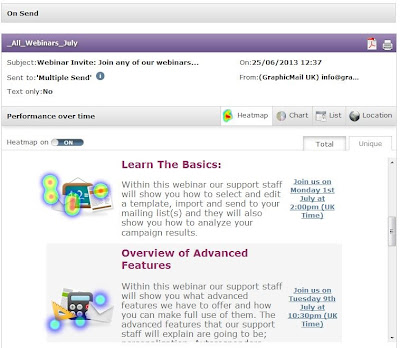 Using this new feature you can now see where people are clicking on your email, and if they aren't clicking on certain areas then you can make the necessary changes:
We hope you like it and don't forget to leave a comment below and of course join us on Facebook and Twitter to keep up to date with more tips, features and email marketing advice.
Read More
You will now see you have access to Heat Maps which will show you where your subscribers are clicking on your email. The heat map will display blue, green and red circles to indicate how many people are clicking on specific areas. If you see a red circle as shown below then you will know most people have clicked on that particular area.

- Are the buttons too small?
- Which links are being used the most?
- Should you include more images or buttons?
We hope you like it and don't forget to leave a comment below and of course join us on Facebook and Twitter to keep up to date with more tips, features and email marketing advice.

Tuesday, 27 August 2013
Free Back To School Email Template
Labels:
Email Design
,
email marketing
,
email template
,
free
,
free templates
,
tips
School is just around the corner and every parent knows it as they get their children ready to make their next step in their schooling career.
As there is only 1 week left until the children go back to school, now is the best time to start sending your exclusive Back To School offers. To make sure you don't miss out on this ideal sales opportunity you can download our FREE Back To School Email Template.
Just edit the images and text within the template to advertise your own back to school products and final reductions.
Live View:
To view the template in your browser just click here
We have displayed the HTML code used for the template below so you can just copy this code and use it to import the template into your account:
We hope you make great use of this FREE Email Template and we wish you luck with your email campaign!
Don't Forget: If you don't already have a GraphicMail account then you can sign up to our 30 day free trial and gain access to 400 more free templates, to sign up just click here.
Read More
As there is only 1 week left until the children go back to school, now is the best time to start sending your exclusive Back To School offers. To make sure you don't miss out on this ideal sales opportunity you can download our FREE Back To School Email Template.
Just edit the images and text within the template to advertise your own back to school products and final reductions.
Live View:
To view the template in your browser just click here
We have displayed the HTML code used for the template below so you can just copy this code and use it to import the template into your account:
We hope you make great use of this FREE Email Template and we wish you luck with your email campaign!
Don't Forget: If you don't already have a GraphicMail account then you can sign up to our 30 day free trial and gain access to 400 more free templates, to sign up just click here.
Friday, 23 August 2013
UK Office Closed For Bank Holiday
Labels:
bank holiday
,
notice
,
office closed
,
UK office
We would like to notify you that our UK office will be closed at an earlier time of 4pm today (Friday 23rd August) and all day Monday 26th August for a Bank Holiday which means our telephone and livechat support will be closed during that time.
Although the live chat and telephone support will be closed, our support team will answer all queries when they return on Tuesday 27th August. If you can't wait until Tuesday then don't worry as we have provided all support materials below:
• Download our interactive manual
• View our online video tutorials
• Search through our Help Centre
• View our previous training webinars
• Email us
We hope you all enjoy a well-deserved break.
Read More
Although the live chat and telephone support will be closed, our support team will answer all queries when they return on Tuesday 27th August. If you can't wait until Tuesday then don't worry as we have provided all support materials below:
• Download our interactive manual
• View our online video tutorials
• Search through our Help Centre
• View our previous training webinars
• Email us
We hope you all enjoy a well-deserved break.
Monday, 19 August 2013
Have You Downloaded Our Freebies Yet?
Labels:
Best Practice
,
checklist
,
data collection
,
downloads
,
email marketing
,
free
,
mailing list
,
tips
,
White Paper
Here at GraphicMail we are always creating new ways to help our customers learn how to manage Email Marketing in the best way for them.
If you are just starting, then Email Marketing can seem like a big task to take on as there is a lot to learn. We understand this which is why we provide numerous free downloads to help you get started.
If you are just learning then our "Becoming an Email Marketer" White Paper is a great place to start.
Alternatively, for those that just need a little help to keep on track then you can download our "Email Marketing Checklist". Our feedback "Hey, that is one awesome check list for email marketing. Very good job!" has certainly been positive so far so get yours now, to download it just click here.
We have also just made a new addition to our freebies; you can now download our new "Growing Your Mailing List" checklist.
We created the "Growing Your Mailing List" checklist for you to use as a guide to gain more subscribers and collect the much needed data in the process. Within this checklist we provide guidance from the beginning stages of deciding what data you should be collecting, all the way through to sending your first welcome email.
To download it just click on the image below or click here:

Don't forget, you can also download any of our 4 White Papers for free! All we ask is for you to LIKE US on Facebook by clicking here; once you like our Facebook page you will have instant access to download all 4 White Papers:
 We hope you find the free downloads above helpful! If you have any ideas of what you would like us to cover next then just get in touch.
Share this with your colleagues and friends via Twitter by clicking this link: http://clicktotweet.com/q5206
Read More
If you are just starting, then Email Marketing can seem like a big task to take on as there is a lot to learn. We understand this which is why we provide numerous free downloads to help you get started.
If you are just learning then our "Becoming an Email Marketer" White Paper is a great place to start.
Alternatively, for those that just need a little help to keep on track then you can download our "Email Marketing Checklist". Our feedback "Hey, that is one awesome check list for email marketing. Very good job!" has certainly been positive so far so get yours now, to download it just click here.
We have also just made a new addition to our freebies; you can now download our new "Growing Your Mailing List" checklist.
We created the "Growing Your Mailing List" checklist for you to use as a guide to gain more subscribers and collect the much needed data in the process. Within this checklist we provide guidance from the beginning stages of deciding what data you should be collecting, all the way through to sending your first welcome email.
To download it just click on the image below or click here:
Don't forget, you can also download any of our 4 White Papers for free! All we ask is for you to LIKE US on Facebook by clicking here; once you like our Facebook page you will have instant access to download all 4 White Papers:
Share this with your colleagues and friends via Twitter by clicking this link: http://clicktotweet.com/q5206
Monday, 22 July 2013
The Do's and Don’ts of Email Marketing
Labels:
data collection
,
design
,
email marketing
,
social
,
testing
,
tips
In email marketing it's important to make sure you are doing everything possible to accommodate your subscribers especially as the environment they are viewing your emails in is rapidly changing.
As it is always changing this makes the need to test your emails in different email clients and devices become more and more valuable, but as always sometimes it is hard to keep track of what you should be doing.
To help you stay on the right track we have listed the do’s and don’ts of email marketing:
 You should:
Read More
As it is always changing this makes the need to test your emails in different email clients and devices become more and more valuable, but as always sometimes it is hard to keep track of what you should be doing.
To help you stay on the right track we have listed the do’s and don’ts of email marketing:
- Alt Text - Add Alt text to all of your images, this will let the recipient know they haven’t downloaded the images and also give them a good indication on what each image will display.
- Be Social – Include hyperlinks to your social network pages so people can follow your company on them. Also if the email is a promotional one then you may want to allow the recipients to share it on their own social network pages or even forward it to a friend. Those options are all available within the email footer.
- View in Browser link – As there are so many different email clients and devices out there it’s almost impossible to make sure your email works perfectly in all of them. Due to this it is always a good idea to provide an escape for the recipient. By adding a “view in browser” link at the top of your email it allows them to view the email outside of the email client which will most likely display the email as intended.
- Provide Buttons – As more and more people are viewing emails on mobile devices the email is no longer being controlled by a mouse. As people are moving around the email with their fingertips its best to respond to that and make it easier for them. Add buttons rather than linked text to allow users to tap them, the advisable button size is at least 44px by 44px.
- Mobile Friendly - You also can make some simple changes to your email design to make it more mobile friendly. Allow more space, keep content to a minimum and don't include large images as they may take too long to download and take too much space in your email. You can easily include media queries to hide images or content by applying styles such as "display:none!important;".
- Reports & Statistics – View your Reports & Statistics to see how your previous email campaigns have done. This allows you to reflect on what has gone well in the past and of course what didn't so you can constantly improve your future campaigns.
- Data Collection – Use the data you have collected from your subscribers so you can segment your mailing list into more targeted groups. By doing this you will be able to send specific emails to those groups making them more relevant which will help to increase your open and click-through rate.
- Mailto: Hyperlinks - Some people tend to hide email addresses in a mailto: link such as having a hyperlink with text “email us” in your email. This is not a good idea as outlook.com ignores it; it is best to display the email address you are asking the recipients to send to such as info@graphicmail.co.uk. By doing this even if the mailto: link doesn't work the recipient can still see the email address so they know who they should send to.
- Long Images – We have found that Outlook Desktop has limitations on the size of any one image it will display. So if you are using very large images and it is not fully showing in outlook then you will likely need to slice the image into 2 so it is no longer 1 big image. If you do this it is also advisable to use this code <img src="image.jpg" style="display:block;"> to ensure it keeps the sliced images together giving the illusion that it is still 1 image.
- Click Here - As many people are now viewing emails on mobiles and devices the action to “click” a mouse is no longer possible as people are using their fingertips to move around the email. As that is mostly the case it is a good idea to change the hyperlinked text or buttons from “click here” to “view and register” or similar so you are no longer telling them to take an action they won't be doing.
- Subscribe Process – Make the subscribing process as easy as possible; if you ask for too much information then you may put your potential subscribers off. You can create as many subscription forms as you would like via your account so don’t cram all of the questions into one form as you always have the option to collect more data at a later date.
Friday, 19 July 2013
All New GraphicMail Dashboard!
Labels:
dashboard
,
new features
,
sms
,
social
,
tips
Have you noticed our new dashboard yet? If not then just log into your account and click on the "Home" tab. Alternatively if you don't have an account yet then signup for our 30 day free trial by clicking here.
Our new dashboard immediately provides you with the key information you need regarding your account. It also provides you with some great features that will save you lots of time and effort.
We have added 4 new features to the dashboard, so let's check them out:
1) News and Activities
 This section will allow you to see what steps you have left to take to setup your account. It will also immediately update you with any new actions you have taken. To help you navigate through your account we have also included new navigation links within the updates such as if you send an email you will be presented with a link to "view reports". Once clicked it will then take you directly to the Reports & Statistics of that send so you can see how your campaign has done.
2) My Account Stats
 Within this section you can easily keep track of your sending as it will allow you to see how many credits you have left. By adding the "My Account Stats" section we have made this information readily available for you, so you can easily check your stats and move on with other tasks.
3) Social
 This Social section is completely new and we think you'll love it! We have cut out the middle men which will save you time as you can now post straight to your twitter and Facebook feed directly from your GraphicMail account. This means you will no longer need to log into your Facebook and Twitter accounts, instead just log into GraphicMail and post to them via your Dashboard (you can even post to both at once).
4) SMS

You can now also send a quick SMS (text message) from your dashboard. By having this option available you can easily send text messages without going into the "Mobile" section of your account.
What do you think of our new changes? Let us know in the comments below as we would love some feedback.
Read More
Our new dashboard immediately provides you with the key information you need regarding your account. It also provides you with some great features that will save you lots of time and effort.
We have added 4 new features to the dashboard, so let's check them out:
1) News and Activities
2) My Account Stats
3) Social
4) SMS
You can now also send a quick SMS (text message) from your dashboard. By having this option available you can easily send text messages without going into the "Mobile" section of your account.
What do you think of our new changes? Let us know in the comments below as we would love some feedback.
Tuesday, 16 July 2013
3 Golden Rules of Email Marketing
Labels:
data collection
,
Email Design
,
email marketing
,
personalisation
,
segmentation
,
targeting
,
testing
,
tips
Email Marketing is a lot more than just sending 1 email to your mailing list. It has the potential to reach out to those one time buyers and bring them back for more. If you are just starting to get to grips with Email Marketing and you would like a little more advice then our Becoming An Email Marketer white paper is a great place to start.
However if you are ready to take full advantage of what Email Marketing has to offer then you should start by following these 3 golden rules:

1) Know your audience:
Before you start to create your email you should think about who the target audience is; who are you sending your email to? What do they expect from your email? How often do they want to receive it?
If you don't have much information about your subscribers then don't worry as you can create as many subscription forms as you need. You can easily add one to a web page or even another email requesting further information from your subscribers. You can also use the Reports & Statistics we provide to see when your subscribers are opening your email and on what type of device.
By knowing your audience you can target your emails which will instantly make them more relevant. Also by knowing what time your recipients take action with your emails you can set your future sends to be sent at that time to help gain the best open and click-through rates possible.
2) Target your emails:
This may sound obvious but everyone is different so make sure your emails represent that. You may be surprised how many people just send 1 standard email to their entire list. This in some cases is fine but for most you can do so much more! As everyone is different it is best to make that noticeable within your emails. The best way to do that is to target your emails specifically at the different people you are sending them to.
I have listed some ways you can do this below:
All email clients will interpret the HTML code used in your email differently which makes it slightly more challenging; but as always we are here to help!
We provide over 400 free templates that you can use and as they have already been tested against the different email clients all you need to do is add your own images and text into them.
Alternatively if you are a bit more adventurous and would like to create your own then we provide an advanced feature called Inbox Preview which is free to use for paying accounts. It will allow you to see how your email looks in over 14 different email clients and even on an iPad and iPhone. As you will be able to see for yourself how your email looks you can be safe in the knowledge that your email will look great regardless of what email client your subscribers are using.
So by following the 3 Golden Rules above you can make sure you get the best out of your email marketing.
Leave us a comment below to let us know if you have tried these tips before or if you have any of your own that you'd like to share.
Read More
However if you are ready to take full advantage of what Email Marketing has to offer then you should start by following these 3 golden rules:
1) Know your audience:
Before you start to create your email you should think about who the target audience is; who are you sending your email to? What do they expect from your email? How often do they want to receive it?
If you don't have much information about your subscribers then don't worry as you can create as many subscription forms as you need. You can easily add one to a web page or even another email requesting further information from your subscribers. You can also use the Reports & Statistics we provide to see when your subscribers are opening your email and on what type of device.
By knowing your audience you can target your emails which will instantly make them more relevant. Also by knowing what time your recipients take action with your emails you can set your future sends to be sent at that time to help gain the best open and click-through rates possible.
2) Target your emails:
This may sound obvious but everyone is different so make sure your emails represent that. You may be surprised how many people just send 1 standard email to their entire list. This in some cases is fine but for most you can do so much more! As everyone is different it is best to make that noticeable within your emails. The best way to do that is to target your emails specifically at the different people you are sending them to.
I have listed some ways you can do this below:
- Add personalisation - You can add personalisation to your emails such as including the latest product bought or the location your subscribers are in. By doing this the recipients will immediately know the products and the content within the email are specifically aimed at them.
- Segment your mailing list - Our segmenatation tool allows you to use the information you have gathered from your subscribers to segment your mailing list into more targeted groups. You can also separate your mailing list using the data provided within the Reports & Statistics. Some examples of groups you can create using the data from your Reports & Statistics are those that regularly open your emails, those that open your emails on a mobile or even those that open your emails at a specific time.
- Make simple changes - Once you know what target audience you are sending to you can start making changes to your email. You may want to consider changing the layout, colour scheme, terminology used in it and the products you present. By making those changes it will help to make the email more relevant and appealing to the recipients.
All email clients will interpret the HTML code used in your email differently which makes it slightly more challenging; but as always we are here to help!
We provide over 400 free templates that you can use and as they have already been tested against the different email clients all you need to do is add your own images and text into them.
Alternatively if you are a bit more adventurous and would like to create your own then we provide an advanced feature called Inbox Preview which is free to use for paying accounts. It will allow you to see how your email looks in over 14 different email clients and even on an iPad and iPhone. As you will be able to see for yourself how your email looks you can be safe in the knowledge that your email will look great regardless of what email client your subscribers are using.
So by following the 3 Golden Rules above you can make sure you get the best out of your email marketing.
Leave us a comment below to let us know if you have tried these tips before or if you have any of your own that you'd like to share.
Subscribe to:
Posts
(
Atom
)
Follow Us


Popular Posts
-
 Have you noticed our new dashboard yet? If not then just log into your account and click on the " Home " tab. Alternatively if you...
-
 Take an exclusive peek at our New Mobile Editor which you will have access to very shortly! Soon you will be able to create a free mobile ...
-
GraphicMail is currently in the last phase of completing the integration of a new email newsletter editor that will let you easily create ...