
Showing posts with label email template. Show all posts
Showing posts with label email template. Show all posts
Monday, 28 October 2013
Are your emails getting lost in Gmail?
Labels:
Best Practice
,
deliverability
,
delivery
,
Email Design
,
email template
,
Gmail
As we get closer to the holiday season we understand that a lot of you are busy dealing with your Halloween and Christmas email campaigns. Although creating visually pleasing emails is important, making sure your emails are being seen is at the top of our list.
You may have noticed there has been a lot of attention over Gmail’s new tabbed inbox lately. For those of you that don’t use Gmail, they have allocated a number of new tabs which helps to automatically organise your emails into specific tabs. Unfortunately this may mean the emails you are sending to your Gmail subscribers are landing in the ‘Promotions’ tab rather than the ‘Primary’ tab.
To help you make sure your emails go into the Primary tab and are therefore immediately seen, our template team have created a new Gmail template which is now available within your account. It provides all of the steps your Gmail subscribers will need to place your emails in the 'Primary' tab.
You can view our Gmail Template below or by clicking here:
You can easily target your Gmail subscribers by following the steps below:
The first step is to create a new mailing list for your Gmail subscribers, to do that click on Advanced Mail (tab at the top) >> Lists & Contacts (tab on the left) >> Manage >> select the green circle with the plus sign and on the right name your new mailing list.
The next step is to copy your Gmail subscribers into that new mailing list, so to do that follow these steps:
Click on Advanced Mail (tab at the top) >> Select “Lists & Contacts” (tab on the left) >> Manage >> select “All Contacts” and then in the search bar at the top right type in “gmail”. That will then display all of your Gmail subscribers >> you can then select “More options” and then just select “Copy these Contact/s to List…” and select your new mailing list.
Once your Gmail subscribers are within that new mailing list, you can then select our new Gmail template and send that your Gmail subscribers. By doing this it will help to make sure your emails land in the 'Primary' tab of Gmail helping your emails get the attention they deserve.
Read More
You may have noticed there has been a lot of attention over Gmail’s new tabbed inbox lately. For those of you that don’t use Gmail, they have allocated a number of new tabs which helps to automatically organise your emails into specific tabs. Unfortunately this may mean the emails you are sending to your Gmail subscribers are landing in the ‘Promotions’ tab rather than the ‘Primary’ tab.
To help you make sure your emails go into the Primary tab and are therefore immediately seen, our template team have created a new Gmail template which is now available within your account. It provides all of the steps your Gmail subscribers will need to place your emails in the 'Primary' tab.
You can view our Gmail Template below or by clicking here:
You can easily target your Gmail subscribers by following the steps below:
The first step is to create a new mailing list for your Gmail subscribers, to do that click on Advanced Mail (tab at the top) >> Lists & Contacts (tab on the left) >> Manage >> select the green circle with the plus sign and on the right name your new mailing list.
The next step is to copy your Gmail subscribers into that new mailing list, so to do that follow these steps:
Click on Advanced Mail (tab at the top) >> Select “Lists & Contacts” (tab on the left) >> Manage >> select “All Contacts” and then in the search bar at the top right type in “gmail”. That will then display all of your Gmail subscribers >> you can then select “More options” and then just select “Copy these Contact/s to List…” and select your new mailing list.
Once your Gmail subscribers are within that new mailing list, you can then select our new Gmail template and send that your Gmail subscribers. By doing this it will help to make sure your emails land in the 'Primary' tab of Gmail helping your emails get the attention they deserve.

Monday, 9 September 2013
Improvements We Have Made For You...
Labels:
dashboard
,
data collection
,
email template
,
free templates
,
mobile editor
,
new features
,
news
,
Reports and Statistics
,
social browser widget
,
social subscribe
We continually improve our system by providing you with more features, improving our interface and more. By doing this we make sure our GraphicMail customers have the best Email Marketing tools at their finger-tips.
Lately we have improved our system by including:
They are allocated into categories to help you locate the type of email template you would like to use.
Here is an example of some email templates you can use:
 We would love to get your feedback about our recent updates so please join us on Facebook and Twitter and leave us a comment.
Read More
Lately we have improved our system by including:
- New Reports & Statistics - We included a new Reports & Statistics section which is more interactive, informative and provides you with more details to help you understand your subscribers.
- New Import Option - OneSaas allows you to connect to more than 50 apps, meaning you can import contacts from CMS, CRM, eventing and financial apps and more.
- New Mobile Editor - Create free mobile sites and you can now even include a link into the text message for free.
- New Dashboard - This provides you with key account information and allows you to post directly to Facebook and Twitter.
- New Social Subscribe - Allow users to sign up to your mailing list via their Social Network accounts.
- List Clean Up tool - Our List Clean Up tool can stop complaints, get rid of bounces and improve delivery.
- New Social Browser Widget - Comment about your newsletter, signup, change the language and more.
- Heat Maps - We have recently added new Heat Maps to our Reports & Statistics section which means you can see where people are clicking in your email.
They are allocated into categories to help you locate the type of email template you would like to use.
Here is an example of some email templates you can use:
Tuesday, 27 August 2013
Free Back To School Email Template
Labels:
Email Design
,
email marketing
,
email template
,
free
,
free templates
,
tips
School is just around the corner and every parent knows it as they get their children ready to make their next step in their schooling career.
As there is only 1 week left until the children go back to school, now is the best time to start sending your exclusive Back To School offers. To make sure you don't miss out on this ideal sales opportunity you can download our FREE Back To School Email Template.
Just edit the images and text within the template to advertise your own back to school products and final reductions.
Live View:
To view the template in your browser just click here
We have displayed the HTML code used for the template below so you can just copy this code and use it to import the template into your account:
We hope you make great use of this FREE Email Template and we wish you luck with your email campaign!
Don't Forget: If you don't already have a GraphicMail account then you can sign up to our 30 day free trial and gain access to 400 more free templates, to sign up just click here.
Read More
As there is only 1 week left until the children go back to school, now is the best time to start sending your exclusive Back To School offers. To make sure you don't miss out on this ideal sales opportunity you can download our FREE Back To School Email Template.
Just edit the images and text within the template to advertise your own back to school products and final reductions.
Live View:
To view the template in your browser just click here
We have displayed the HTML code used for the template below so you can just copy this code and use it to import the template into your account:
We hope you make great use of this FREE Email Template and we wish you luck with your email campaign!
Don't Forget: If you don't already have a GraphicMail account then you can sign up to our 30 day free trial and gain access to 400 more free templates, to sign up just click here.
Wednesday, 8 May 2013
Why Choose Email Marketing?
Labels:
a/b testing
,
advanced features
,
autoresponders
,
email marketing
,
email template
,
reporting
,
social browser widget
,
Social Marketing
,
subscription form
,
tips
,
trial
,
webinars

- Getting Started – You can sign up for a 30 day trial or go straight into a paying account for as little as £9.95+VAT which will allow you to send 2,000 emails a month. When you compare this to actually sending a letter in the post you can see how cost effective email marketing can be. As well as being cost effective, unlike sending a letter in the post you can actually see who is interested by viewing opened and clicked statistics.
- Capture Data – You can create multiple subscription forms which can be placed on your website or on Facebook to capture data from your viewers. You can then use that captured data to separate your lists into smaller more targeted groups or use the data to insert personalisation into your emails.
- List Management – Our system automatically manages the email addresses you have added into your mailing list so when someone unsubscribes you don’t have to worry, we will make sure you don’t email them again. You can also import email addresses via excel spreadsheets, online email clients, or even use our integrations.
- Email Templates – We provide over 400 email templates for you to choose from so you can easily find one that suits your business. As they have been created for you they will work in all the different email clients so all you need to do is add your own images and text and you will be ready to send.
For the more computer savvy people out there, you can upload your own HTML template and send that to your subscribers. However before hitting send we suggest you use our free Inbox Preview tool as that will show you exactly how it looks in over 14 different email clients so you know it will display correctly for your subscribers. - Keep The Conversation Going – We provide numerous features within the GraphicMail account so you can always make the most of those taking action within your emails. You can use our Auto-responders to have an automated email sent once a subscriber opens or clicks on a link in your email. Alternatively you can use the data provided within the Reports & Statistics to follow up on any further actions taken.
- Go Social – Within your GraphicMail account you can not only allow users to forward emails to their friends but they can also "like", comment or share your email on their own Facebook or Twitter account using our Social Browser widget. Of course you can also easily post your emails to your own Facebook and Twitter accounts.
- Reports & Statistics – Don't forget to check your Reports & Statistics to see what has worked well. We provide you with sent, delivered, bounced, opened, clicked, shared, unsubscribed and more. You can easily use the information given to improve your next email campaigns. Alternatively if it didn't work as well as you hoped then why not use our A/B Testing feature as that will help you to get the best open or click through rate.
Monday, 1 April 2013
Create Your Newsletter
Labels:
drag and drop editor
,
editing newsletter
,
email template
Get
started creating stunning email
newsletters with GraphicMail. We have tons of pre-designed email templates to
choose from, and you can upload your own layout to design a custom look. We
make it easy to add personalization to your email messages with merge tags.

Read More
Creating a
newsletter is as easy as 1-2-3!
1. Create a
newsletter
2. Add
content & edit
3. Prep for
sending
Step 1:
Create a fresh newsletter
After
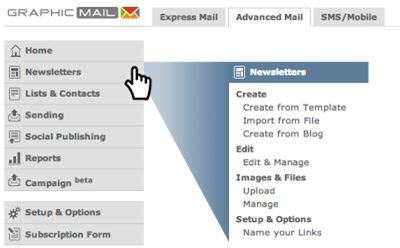
logging into your account, start by clicking Newsletters in the left navigation
menu and then selecting one of the three Create options:
Newsletters > Create from Template
Whatever the
occasion, we have a template for it! Check out our template categories for
stylish ready-made designs to launch your campaign. Just give your template a
name to get started.
Newsletters
> Import from File
Upload your
own design to our newsletter and begin adding content right away, or you can
edit your design further within the editor. Upload your word, text, or HTML
files, or link to the appropriate URL.
Newsletters
> Upload from Blog
Click
‘create new’ to fetch the design style from a blog or any RSS feed and
replicate the same style in a ready-to-send email template. Just input your
feed's URL and our design editor will do the rest.
Step 2: Add
content to your newsletter
Give the
newsletter editor a spin by adding content to your message or editing various
design aspects. For step by step tips on how to edit and personalise
newsletters, please refer to the tutorial video guides in the help center or
consider taking part in one of our free How-to-get-started webinars.
GM TIP #1:
Keep your designs and layout simple. They are easier to send, open, and read
for your subscribers.
GM TIP #2:
Maintain a healthy balance of text versus images in your newsletters. Keep in
mind though that your images might not always render perfectly for all email
clients, so it is important to preview your emails on popular email platforms.

Step 3: Prep
for sending
GraphicMail
offers several pre-send check tools to ensure everything is in order prior to
sending. Please visit the following introductory guides for checking your spam
score, previewing your message, and setting up A/B split tests.
Subscribe to:
Posts
(
Atom
)
Follow Us


Popular Posts
-
 Have you noticed our new dashboard yet? If not then just log into your account and click on the " Home " tab. Alternatively if you...
-
 Take an exclusive peek at our New Mobile Editor which you will have access to very shortly! Soon you will be able to create a free mobile ...
-
GraphicMail is currently in the last phase of completing the integration of a new email newsletter editor that will let you easily create ...