
Thursday, 4 April 2013
View reports to track your campaign
Labels:
data collection
,
Reports and Statistics
,
segmentation
,
tips
Once you have created your newsletter and sent your message, view reports on open rates, click through rates, and share rates from your campaign.
Our reporting tools make it easy to decipher key performance indicators in your campaign, and then use these insights to improve on future sends. Get started by clicking 'Reports' and 'On sends'.

The reports dashboard shows you all the most important categories that help you gauge the success of your send. Here you can see how many of your mails were delivered, how many of them bounced, how many were opened, and how your subscribers clicked through them. You can even compare your results to your industry's benchmarks for email marketing campaigns.
GraphicMail’s reporting tools even tell you:
• Where in the world people open your mail
• When they read and engage with your message
• What operating system and browser they used
This information is perfect for further segmenting of your subscribers and building clearer demographic stats for your future marketing communications.
For step by step help on how to read your reports, check out this video from our GraphicMail help center.
Read More
Our reporting tools make it easy to decipher key performance indicators in your campaign, and then use these insights to improve on future sends. Get started by clicking 'Reports' and 'On sends'.
The reports dashboard shows you all the most important categories that help you gauge the success of your send. Here you can see how many of your mails were delivered, how many of them bounced, how many were opened, and how your subscribers clicked through them. You can even compare your results to your industry's benchmarks for email marketing campaigns.
GraphicMail’s reporting tools even tell you:
• Where in the world people open your mail
• When they read and engage with your message
• What operating system and browser they used
This information is perfect for further segmenting of your subscribers and building clearer demographic stats for your future marketing communications.
For step by step help on how to read your reports, check out this video from our GraphicMail help center.

Wednesday, 3 April 2013
Successful campaigners always test first
Labels:
a/b testing
,
Inbox Preview
,
send a test
,
testing
,
tips
If you would like to double check how your newsletter will send, send a quicktest email before launching the rest of your campaign.
After creating a newsletter, click on ‘Sending’ in the left navigation menu, and click ‘Send a test.’ Follow the on-screen instructions to send your free test.

GM Tip: take advantage of GraphicMail’s Inbox Preview tool to see how the newsletter will look in popular email providers, such as Outlook, Gmail, AOL, and more. Just click ‘Inbox Preview’ under Advanced mail features.
While we’re on the subject of testing, be sure to check out our A/B spilt testing feature. This is a great way to optimize your email marketing efforts and gather valuable insight into your customers preferences.
For step by step instructions, please see our help center guide
Read More
After creating a newsletter, click on ‘Sending’ in the left navigation menu, and click ‘Send a test.’ Follow the on-screen instructions to send your free test.

GM Tip: take advantage of GraphicMail’s Inbox Preview tool to see how the newsletter will look in popular email providers, such as Outlook, Gmail, AOL, and more. Just click ‘Inbox Preview’ under Advanced mail features.
While we’re on the subject of testing, be sure to check out our A/B spilt testing feature. This is a great way to optimize your email marketing efforts and gather valuable insight into your customers preferences.
For step by step instructions, please see our help center guide
Tuesday, 2 April 2013
Create Your Address Book
Labels:
data collection
,
email marketing
,
lists and contacts
,
tips
Here’s a quick explanation of the various ways you can upload contacts to your GM account address book:

Lists & Contacts > Manage your contacts
Click the "+" symbol the left-hand list column, and give your new list a name. Then click the "+" symbol again in the right-hand addressee column to manually add profile information to your dataset.
Lists & Contacts > Import your contacts:
• Add by copy and paste or typing
• Import from file using xls or csv
• Import from online email accounts such as Gmail, Yahoo, etc.
• Sync your cloud applications with GraphicMail: OneSaas connects cloud apps and synchronizes the data - so it connects your GraphicMail app with any of 50 cloud apps like CRM, CMS, eventing and financial apps and more.
Lists & Contacts > List clean tool
GM Tip: use our List Clean tool to remove faulty and duplicate email addresses from your lists. And follow other list building best practices to amass a healthy subscriber base, such as opt in subscription forms and using report metrics to deliver the right content to your subscribers at the right time.
GM Tip: use an opt-in subscription form
GM Tip: gather insight from report metrics
For step by step tips on how to upload and edit contacts check out our help center files and videos within your GraphicMail account.
Becoming An Email Marketer
Labels:
advanced features
,
Best Practice
,
email marketing
,
Email Tips
,
free templates
,
Reports and Statistics
,
subscription form
,
White Paper
Email marketing can seem like a big task to undertake but by using an Email Service Provider such as ourselves we take a load off your shoulders. We have outlined the basics that you should be aware of when you first start:
To download it simply click here or click on the image below:

Read More
- Use a Template – We provide over 400 templates which you can use by adding your own text and images into them. The reason we suggest you use a template is because all email clients and devices have their own way to interpret emails. By using a template you can be confident that it will display correctly regardless of the email client or device your subscribers are using.
- Clear Calls To Action – Display clear calls-to-action within your emails, if you want your subscribers to click on a link/image or share your email then make it obvious to them.
- Advanced Features - We provide numerous advanced features which can make email marketing a breeze. If you are not fully aware of them then join our live webinars so you know what features you should be using.
- Provide An Option To Subscribe – It's important to give all recipients an option to sign up to receive your emails as your subscribers might share your email with friends or on social network sites. We provide a subscription form which can be added onto your website or Facebook, alternatively you can add a subscribe option within the footer of the emails you are sending out.
- Use Reports & Statistics – We provide very detailed reports & statistics which allow you to analyse your campaigns. Within the reports & statistics you can see when your subscribers are taking action within your emails to determine the best time to send. You can also create new mailing lists of those that are taking action with your emails such as if they open, click a link or even share your email.
To download it simply click here or click on the image below:
Monday, 1 April 2013
Create Your Newsletter
Labels:
drag and drop editor
,
editing newsletter
,
email template
Get
started creating stunning email
newsletters with GraphicMail. We have tons of pre-designed email templates to
choose from, and you can upload your own layout to design a custom look. We
make it easy to add personalization to your email messages with merge tags.

Read More
Creating a
newsletter is as easy as 1-2-3!
1. Create a
newsletter
2. Add
content & edit
3. Prep for
sending
Step 1:
Create a fresh newsletter
After
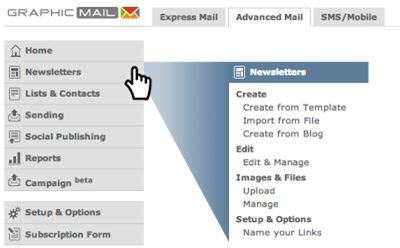
logging into your account, start by clicking Newsletters in the left navigation
menu and then selecting one of the three Create options:
Newsletters > Create from Template
Whatever the
occasion, we have a template for it! Check out our template categories for
stylish ready-made designs to launch your campaign. Just give your template a
name to get started.
Newsletters
> Import from File
Upload your
own design to our newsletter and begin adding content right away, or you can
edit your design further within the editor. Upload your word, text, or HTML
files, or link to the appropriate URL.
Newsletters
> Upload from Blog
Click
‘create new’ to fetch the design style from a blog or any RSS feed and
replicate the same style in a ready-to-send email template. Just input your
feed's URL and our design editor will do the rest.
Step 2: Add
content to your newsletter
Give the
newsletter editor a spin by adding content to your message or editing various
design aspects. For step by step tips on how to edit and personalise
newsletters, please refer to the tutorial video guides in the help center or
consider taking part in one of our free How-to-get-started webinars.
GM TIP #1:
Keep your designs and layout simple. They are easier to send, open, and read
for your subscribers.
GM TIP #2:
Maintain a healthy balance of text versus images in your newsletters. Keep in
mind though that your images might not always render perfectly for all email
clients, so it is important to preview your emails on popular email platforms.

Step 3: Prep
for sending
GraphicMail
offers several pre-send check tools to ensure everything is in order prior to
sending. Please visit the following introductory guides for checking your spam
score, previewing your message, and setting up A/B split tests.
Thursday, 28 March 2013
We Are Away For Easter...
We would like to notify you that the live chat and telephone support will be unavailable over the Easter break from Friday 29th March - Monday 1st April.
Although the live chat and telephone support will be closed over this period our support team will still be checking emails so if you do experience any issues or you require any assistance over this period that is not covered by our help center's online tutorials and help files; then please contact us at support@graphicmail.co.uk and we will endeavour to get back to you within 24 hours.
We will return as normal on Tuesday 2nd April at 9am however, until then you may want to use the support materials below:
• Download our interactive manual
• View our online video tutorials
• Search through our Help Centre
• View our previous training webinars
• Email us
We hope you have a well-deserved break and a Happy Easter!
Read More
Although the live chat and telephone support will be closed over this period our support team will still be checking emails so if you do experience any issues or you require any assistance over this period that is not covered by our help center's online tutorials and help files; then please contact us at support@graphicmail.co.uk and we will endeavour to get back to you within 24 hours.
We will return as normal on Tuesday 2nd April at 9am however, until then you may want to use the support materials below:
• Download our interactive manual
• View our online video tutorials
• Search through our Help Centre
• View our previous training webinars
• Email us
We hope you have a well-deserved break and a Happy Easter!
Monday, 25 March 2013
Free Easter Templates
Labels:
Best Practice
,
Easter
,
Email Design
,
Embellishments
,
Inbox Preview
,
Reports and Statistics
,
segmentation
,
Smart Elements
We know holidays can be a hectic time so we have made it as easy as possible for you to create your Easter campaign. We have 6 free templates for you to choose from as shown below:
 Choosing a template is a great start but to help you further we have listed 5 easy
steps for you to follow to make sure you are able to achieve what you want from your
campaign:
Read More
- Who is your target audience? Is it specific, if so then use the data you have from your subscribers to segment your mailing list so you only send to your targeted audience, this can be done using segmentation.
- What is the aim for your email? Is it to inform the users of a new feature, product or a special offer? Whatever your aim is make sure it is clearly visible within the content. It is best to place the most important content at the top of your email as that will be the first thing your recipients see.
- Make good use of images - Images are a great way to get your point across in an attractive manner. We offer hundreds of free images within the Smart Elements and Embellishment section so why not check them out.
- Test your email - Testing your email cannot be understated. The email you are sending out is a representation of your company so if it doesn't look very good in a particular email client then a recipient using that email client will not think very highly of your company. Don't worry though as we have the cure, use our Inbox Preview tool as that will show you exactly how your email will look in over 14 different email clients and best of all it is free to use for all paying accounts.
- Sending at the right time - When sending your email it is important to make sure it isn't going to land in the heap of other emails your recipients may have. To prevent that from happening, check your Reports & Statistics for previous sends to see what time your recipients take action within them as that will likely be the best time to send.
Subscribe to:
Posts
(
Atom
)
Follow Us


Popular Posts
-
 Have you noticed our new dashboard yet? If not then just log into your account and click on the " Home " tab. Alternatively if you...
-
 Take an exclusive peek at our New Mobile Editor which you will have access to very shortly! Soon you will be able to create a free mobile ...
-
GraphicMail is currently in the last phase of completing the integration of a new email newsletter editor that will let you easily create ...